Published by Dimitris Kougioumtzis · Updated
Choose integer pixel coordinates using an incrementally updated decision error; no floating-point calculation is required.
Traverse one octant using a midpoint decision variable, choosing whether the next pixel also decreases the vertical coordinate. Reflect each selected point through eight symmetries and remove coincident axis or diagonal pixels.
When to use Midpoint circle rasterization
Drawing an integer circle outline with exact incremental decisions and eight-way symmetry.
Choosing an alternative
Bresenham line plotting chooses pixels along a segment. Circle plotting follows a changing slope and uses symmetry; the midpoint recurrence itself uses no square root.
Worked example: input and state changes
Example input
0,0,6These checkpoints follow the actual example timeline. State details show the stored values and decisions; use the visualization to inspect every intervening step.
Step 0: Integer pixel centers on equal-scale axes; faint points are not processed yet.
State at this checkpoint
{
  "values": [
    0,
    1,
    2,
    3,
    4,
    5,
    6,
    7,
    8,
    9,
    10,
    11,
    12,
    13,
    14,
    15,
    16,
    17,
    18,
    19,
    20,
    21,
    22,
    23,
    24,
    25,
    26,
    27,
    28,
    29,
    30,
    31
  ],
  "active": [],
  "kind": "graph",
  "points": [
    [
      -6,
      -2
    ],
    [
      -6,
      -1
    ],
    [
      -6,
      0
    ],
    [
      -6,
      1
    ],
    [
      -6,
      2
    ],
    [
      -5,
      -3
    ],
    [
      -5,
      3
    ],
    [
      -4,
      -4
    ],
    [
      -4,
      4
    ],
    [
      -3,
      -5
    ],
    [
      -3,
      5
    ],
    [
      -2,
      -6
    ],
    [
      -2,
      6
    ],
    [
      -1,
      -6
    ],
    [
      -1,
      6
    ],
    [
      0,
      -6
    ],
    [
      0,
      6
    ],
    [
      1,
      -6
    ],
    [
      1,
      6
    ],
    [
      2,
      -6
    ],
    [
      2,
      6
    ],
    [
      3,
      -5
    ],
    [
      3,
      5
    ],
    [
      4,
      -4
    ],
    [
      4,
      4
    ],
    [
      5,
      -3
    ],
    [
      5,
      3
    ],
    [
      6,
      -2
    ],
    [
      6,
      -1
    ],
    [
      6,
      0
    ],
    [
      6,
      1
    ],
    [
      6,
      2
    ]
  ],
  "nodeLabels": [
    "(-6, -2)",
    "(-6, -1)",
    "(-6, 0)",
    "(-6, 1)",
    "(-6, 2)",
    "(-5, -3)",
    "(-5, 3)",
    "(-4, -4)",
    "(-4, 4)",
    "(-3, -5)",
    "(-3, 5)",
    "(-2, -6)",
    "(-2, 6)",
    "(-1, -6)",
    "(-1, 6)",
    "(0, -6)",
    "(0, 6)",
    "(1, -6)",
    "(1, 6)",
    "(2, -6)",
    "(2, 6)",
    "(3, -5)",
    "(3, 5)",
    "(4, -4)",
    "(4, 4)",
    "(5, -3)",
    "(5, 3)",
    "(6, -2)",
    "(6, -1)",
    "(6, 0)",
    "(6, 1)",
    "(6, 2)"
  ],
  "pointLabelIndices": [
    2,
    15,
    16,
    29
  ],
  "directed": false,
  "chosen": [],
  "visited": [],
  "result": 0,
  "output": []
}
Step 2: Octant (1, 6); midpoint decision -2; add 8 distinct symmetric pixels.
State at this checkpoint
{
  "values": [
    0,
    1,
    2,
    3,
    4,
    5,
    6,
    7,
    8,
    9,
    10,
    11,
    12,
    13,
    14,
    15,
    16,
    17,
    18,
    19,
    20,
    21,
    22,
    23,
    24,
    25,
    26,
    27,
    28,
    29,
    30,
    31
  ],
  "active": [
    18,
    14,
    17,
    13,
    30,
    3,
    28,
    1
  ],
  "kind": "graph",
  "points": [
    [
      -6,
      -2
    ],
    [
      -6,
      -1
    ],
    [
      -6,
      0
    ],
    [
      -6,
      1
    ],
    [
      -6,
      2
    ],
    [
      -5,
      -3
    ],
    [
      -5,
      3
    ],
    [
      -4,
      -4
    ],
    [
      -4,
      4
    ],
    [
      -3,
      -5
    ],
    [
      -3,
      5
    ],
    [
      -2,
      -6
    ],
    [
      -2,
      6
    ],
    [
      -1,
      -6
    ],
    [
      -1,
      6
    ],
    [
      0,
      -6
    ],
    [
      0,
      6
    ],
    [
      1,
      -6
    ],
    [
      1,
      6
    ],
    [
      2,
      -6
    ],
    [
      2,
      6
    ],
    [
      3,
      -5
    ],
    [
      3,
      5
    ],
    [
      4,
      -4
    ],
    [
      4,
      4
    ],
    [
      5,
      -3
    ],
    [
      5,
      3
    ],
    [
      6,
      -2
    ],
    [
      6,
      -1
    ],
    [
      6,
      0
    ],
    [
      6,
      1
    ],
    [
      6,
      2
    ]
  ],
  "nodeLabels": [
    "(-6, -2)",
    "(-6, -1)",
    "(-6, 0)",
    "(-6, 1)",
    "(-6, 2)",
    "(-5, -3)",
    "(-5, 3)",
    "(-4, -4)",
    "(-4, 4)",
    "(-3, -5)",
    "(-3, 5)",
    "(-2, -6)",
    "(-2, 6)",
    "(-1, -6)",
    "(-1, 6)",
    "(0, -6)",
    "(0, 6)",
    "(1, -6)",
    "(1, 6)",
    "(2, -6)",
    "(2, 6)",
    "(3, -5)",
    "(3, 5)",
    "(4, -4)",
    "(4, 4)",
    "(5, -3)",
    "(5, 3)",
    "(6, -2)",
    "(6, -1)",
    "(6, 0)",
    "(6, 1)",
    "(6, 2)"
  ],
  "pointLabelIndices": [
    2,
    15,
    16,
    29
  ],
  "directed": false,
  "chosen": [],
  "visited": [
    16,
    15,
    29,
    2,
    18,
    14,
    17,
    13,
    30,
    3,
    28,
    1
  ],
  "result": 12,
  "output": []
}
Step 3: Octant (2, 6); midpoint decision 3; add 8 distinct symmetric pixels.
State at this checkpoint
{
  "values": [
    0,
    1,
    2,
    3,
    4,
    5,
    6,
    7,
    8,
    9,
    10,
    11,
    12,
    13,
    14,
    15,
    16,
    17,
    18,
    19,
    20,
    21,
    22,
    23,
    24,
    25,
    26,
    27,
    28,
    29,
    30,
    31
  ],
  "active": [
    20,
    12,
    19,
    11,
    31,
    4,
    27,
    0
  ],
  "kind": "graph",
  "points": [
    [
      -6,
      -2
    ],
    [
      -6,
      -1
    ],
    [
      -6,
      0
    ],
    [
      -6,
      1
    ],
    [
      -6,
      2
    ],
    [
      -5,
      -3
    ],
    [
      -5,
      3
    ],
    [
      -4,
      -4
    ],
    [
      -4,
      4
    ],
    [
      -3,
      -5
    ],
    [
      -3,
      5
    ],
    [
      -2,
      -6
    ],
    [
      -2,
      6
    ],
    [
      -1,
      -6
    ],
    [
      -1,
      6
    ],
    [
      0,
      -6
    ],
    [
      0,
      6
    ],
    [
      1,
      -6
    ],
    [
      1,
      6
    ],
    [
      2,
      -6
    ],
    [
      2,
      6
    ],
    [
      3,
      -5
    ],
    [
      3,
      5
    ],
    [
      4,
      -4
    ],
    [
      4,
      4
    ],
    [
      5,
      -3
    ],
    [
      5,
      3
    ],
    [
      6,
      -2
    ],
    [
      6,
      -1
    ],
    [
      6,
      0
    ],
    [
      6,
      1
    ],
    [
      6,
      2
    ]
  ],
  "nodeLabels": [
    "(-6, -2)",
    "(-6, -1)",
    "(-6, 0)",
    "(-6, 1)",
    "(-6, 2)",
    "(-5, -3)",
    "(-5, 3)",
    "(-4, -4)",
    "(-4, 4)",
    "(-3, -5)",
    "(-3, 5)",
    "(-2, -6)",
    "(-2, 6)",
    "(-1, -6)",
    "(-1, 6)",
    "(0, -6)",
    "(0, 6)",
    "(1, -6)",
    "(1, 6)",
    "(2, -6)",
    "(2, 6)",
    "(3, -5)",
    "(3, 5)",
    "(4, -4)",
    "(4, 4)",
    "(5, -3)",
    "(5, 3)",
    "(6, -2)",
    "(6, -1)",
    "(6, 0)",
    "(6, 1)",
    "(6, 2)"
  ],
  "pointLabelIndices": [
    2,
    15,
    16,
    29
  ],
  "directed": false,
  "chosen": [],
  "visited": [
    16,
    15,
    29,
    2,
    18,
    14,
    17,
    13,
    30,
    3,
    28,
    1,
    20,
    12,
    19,
    11,
    31,
    4,
    27,
    0
  ],
  "result": 20,
  "output": []
}
Step 5: Octant (4, 4); midpoint decision 1; add 4 distinct symmetric pixels.
State at this checkpoint
{
  "values": [
    0,
    1,
    2,
    3,
    4,
    5,
    6,
    7,
    8,
    9,
    10,
    11,
    12,
    13,
    14,
    15,
    16,
    17,
    18,
    19,
    20,
    21,
    22,
    23,
    24,
    25,
    26,
    27,
    28,
    29,
    30,
    31
  ],
  "active": [
    24,
    8,
    23,
    7
  ],
  "kind": "graph",
  "points": [
    [
      -6,
      -2
    ],
    [
      -6,
      -1
    ],
    [
      -6,
      0
    ],
    [
      -6,
      1
    ],
    [
      -6,
      2
    ],
    [
      -5,
      -3
    ],
    [
      -5,
      3
    ],
    [
      -4,
      -4
    ],
    [
      -4,
      4
    ],
    [
      -3,
      -5
    ],
    [
      -3,
      5
    ],
    [
      -2,
      -6
    ],
    [
      -2,
      6
    ],
    [
      -1,
      -6
    ],
    [
      -1,
      6
    ],
    [
      0,
      -6
    ],
    [
      0,
      6
    ],
    [
      1,
      -6
    ],
    [
      1,
      6
    ],
    [
      2,
      -6
    ],
    [
      2,
      6
    ],
    [
      3,
      -5
    ],
    [
      3,
      5
    ],
    [
      4,
      -4
    ],
    [
      4,
      4
    ],
    [
      5,
      -3
    ],
    [
      5,
      3
    ],
    [
      6,
      -2
    ],
    [
      6,
      -1
    ],
    [
      6,
      0
    ],
    [
      6,
      1
    ],
    [
      6,
      2
    ]
  ],
  "nodeLabels": [
    "(-6, -2)",
    "(-6, -1)",
    "(-6, 0)",
    "(-6, 1)",
    "(-6, 2)",
    "(-5, -3)",
    "(-5, 3)",
    "(-4, -4)",
    "(-4, 4)",
    "(-3, -5)",
    "(-3, 5)",
    "(-2, -6)",
    "(-2, 6)",
    "(-1, -6)",
    "(-1, 6)",
    "(0, -6)",
    "(0, 6)",
    "(1, -6)",
    "(1, 6)",
    "(2, -6)",
    "(2, 6)",
    "(3, -5)",
    "(3, 5)",
    "(4, -4)",
    "(4, 4)",
    "(5, -3)",
    "(5, 3)",
    "(6, -2)",
    "(6, -1)",
    "(6, 0)",
    "(6, 1)",
    "(6, 2)"
  ],
  "pointLabelIndices": [
    2,
    15,
    16,
    29
  ],
  "directed": false,
  "chosen": [],
  "visited": [
    16,
    15,
    29,
    2,
    18,
    14,
    17,
    13,
    30,
    3,
    28,
    1,
    20,
    12,
    19,
    11,
    31,
    4,
    27,
    0,
    22,
    10,
    21,
    9,
    26,
    6,
    25,
    5,
    24,
    8,
    23,
    7
  ],
  "result": 32,
  "output": []
}
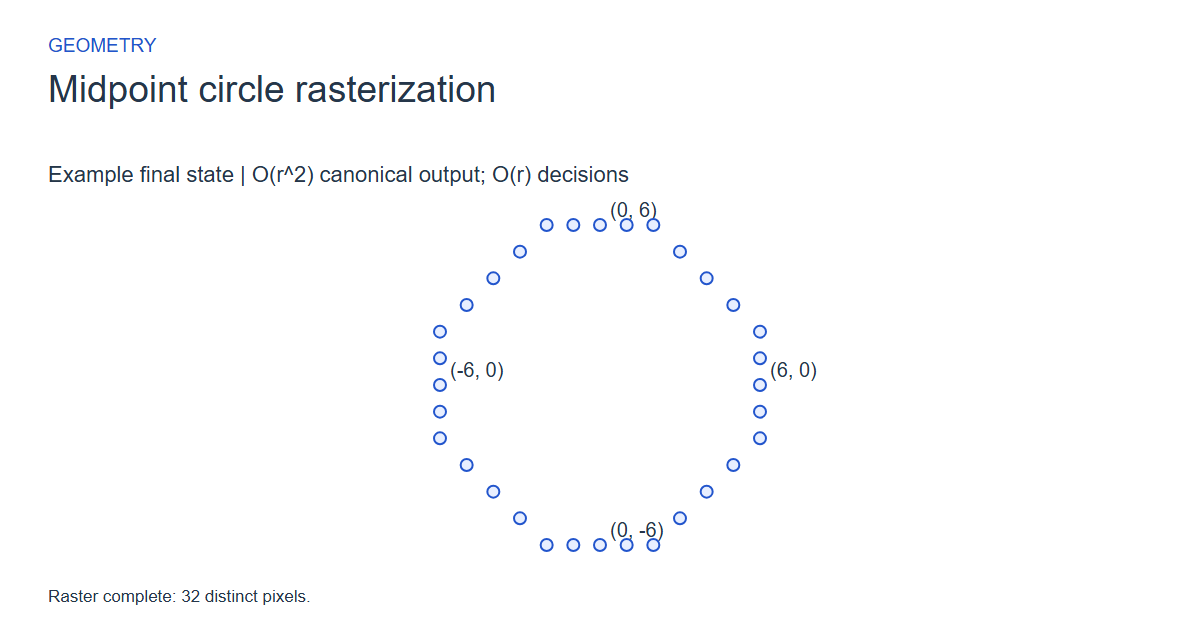
Step 6: Raster complete: 32 distinct pixels.
State at this checkpoint
{
  "values": [
    0,
    1,
    2,
    3,
    4,
    5,
    6,
    7,
    8,
    9,
    10,
    11,
    12,
    13,
    14,
    15,
    16,
    17,
    18,
    19,
    20,
    21,
    22,
    23,
    24,
    25,
    26,
    27,
    28,
    29,
    30,
    31
  ],
  "active": [],
  "kind": "graph",
  "points": [
    [
      -6,
      -2
    ],
    [
      -6,
      -1
    ],
    [
      -6,
      0
    ],
    [
      -6,
      1
    ],
    [
      -6,
      2
    ],
    [
      -5,
      -3
    ],
    [
      -5,
      3
    ],
    [
      -4,
      -4
    ],
    [
      -4,
      4
    ],
    [
      -3,
      -5
    ],
    [
      -3,
      5
    ],
    [
      -2,
      -6
    ],
    [
      -2,
      6
    ],
    [
      -1,
      -6
    ],
    [
      -1,
      6
    ],
    [
      0,
      -6
    ],
    [
      0,
      6
    ],
    [
      1,
      -6
    ],
    [
      1,
      6
    ],
    [
      2,
      -6
    ],
    [
      2,
      6
    ],
    [
      3,
      -5
    ],
    [
      3,
      5
    ],
    [
      4,
      -4
    ],
    [
      4,
      4
    ],
    [
      5,
      -3
    ],
    [
      5,
      3
    ],
    [
      6,
      -2
    ],
    [
      6,
      -1
    ],
    [
      6,
      0
    ],
    [
      6,
      1
    ],
    [
      6,
      2
    ]
  ],
  "nodeLabels": [
    "(-6, -2)",
    "(-6, -1)",
    "(-6, 0)",
    "(-6, 1)",
    "(-6, 2)",
    "(-5, -3)",
    "(-5, 3)",
    "(-4, -4)",
    "(-4, 4)",
    "(-3, -5)",
    "(-3, 5)",
    "(-2, -6)",
    "(-2, 6)",
    "(-1, -6)",
    "(-1, 6)",
    "(0, -6)",
    "(0, 6)",
    "(1, -6)",
    "(1, 6)",
    "(2, -6)",
    "(2, 6)",
    "(3, -5)",
    "(3, 5)",
    "(4, -4)",
    "(4, 4)",
    "(5, -3)",
    "(5, 3)",
    "(6, -2)",
    "(6, -1)",
    "(6, 0)",
    "(6, 1)",
    "(6, 2)"
  ],
  "pointLabelIndices": [
    2,
    15,
    16,
    29
  ],
  "directed": false,
  "chosen": [],
  "visited": [
    16,
    15,
    29,
    2,
    18,
    14,
    17,
    13,
    30,
    3,
    28,
    1,
    20,
    12,
    19,
    11,
    31,
    4,
    27,
    0,
    22,
    10,
    21,
    9,
    26,
    6,
    25,
    5,
    24,
    8,
    23,
    7
  ],
  "result": 32,
  "output": [
    -6,
    -2,
    -6,
    -1,
    -6,
    0,
    -6,
    1,
    -6,
    2,
    -5,
    -3,
    -5,
    3,
    -4,
    -4,
    -4,
    4,
    -3,
    -5,
    -3,
    5,
    -2,
    -6,
    -2,
    6,
    -1,
    -6,
    -1,
    6,
    0,
    -6,
    0,
    6,
    1,
    -6,
    1,
    6,
    2,
    -6,
    2,
    6,
    3,
    -5,
    3,
    5,
    4,
    -4,
    4,
    4,
    5,
    -3,
    5,
    3,
    6,
    -2,
    6,
    -1,
    6,
    0,
    6,
    1,
    6,
    2
  ]
}
Expected final state
Raster complete: 32 distinct pixels.
Complexity and input bounds
Family: Geometry. Time complexity: O(r^2) canonical output; O(r) decisions.
Implementation detail: Center coordinates -10..10 and radius 0..8. Downloads return the unique pixel count and interleaved x,y pairs sorted lexicographically. Capacity 128 integers suffices. Integer decision steps are O(r); bounded duplicate checks and insertion sorting make the portable canonical-output pipeline O(r^2). Python uses set deduplication and standard sorting.
Space complexity: O(r) output storage and O(1) decision state, plus recorded frames.
Working-space bounds describe algorithm state and any explicitly noted output, excluding the visualization's saved timeline. Recording frames can use more memory than running the function alone. Here n is sequence length, V and E are vertex and edge counts, and other parameters refer to the named input dimensions.
centerX,centerY,radius; center -10..10 and radius 0..8. Emit unique symmetric pixels, sorted lexicographically.
The playground validates these limits before starting. Downloaded functions are callable implementations, with parameter and output-buffer contracts in their comments; they do not all repeat the playground's input validation.
Common mistakes and limitations
Do not emit duplicate pixels on axes and diagonals. Radius zero produces the center once. Update the decision after changing the octant coordinate, and distinguish linear decision work from output sorting costs.
Further reading
For background on algorithm analysis and the JavaScript function interface:
- MIT OpenCourseWare: algorithm design and analysis foundations
- MDN: JavaScript function parameters and return values
Editorial and testing approach · Browse all algorithm guides
Complete JavaScript implementation
1 2 3 4 5 6 7 | // Midpoint circle radius 0..8, center -10..10. Return unique pixel count, write interleaved x,y coordinates in lexicographic order. Output capacity 128 integers suffices. Radius zero emits the center once. Integer octant decision is O(r); this bounded teaching implementation uses O(r^2) duplicate checking and insertion sorting for canonical output, not an O(r) full pipeline. Python uses a set and standard sorting. Reference snippets assume validated playground inputs. Fixed scratch buffers have 256 slots. Sorting variants may use a different traversal strategy than the animation. function algorithm(cx, cy, radius, output) { let x = 0; let y = radius; let decision = 1-radius; let count = 0; let px = 0; let py = 0; let a = 0; let b = 0; let duplicate = 0; let keyX = 0; let keyY = 0; let cursor = 0; while (x <= y) { for (let s = 0; s < 8; s++) { a = x; b = y; if (s >= 4) { a = y; b = x; } if (s%2 == 1) { a = -a; } if ((s%4) >= 2) { b = -b; } px = cx+a; py = cy+b; duplicate = 0; for (let i = 0; i < count; i++) { if (output[2*i] == px && output[2*i+1] == py) { duplicate = 1; } } if (duplicate == 0) { output[2*count] = px; output[2*count+1] = py; count++; } } x++; if (decision < 0) { decision += 2*x+1; } else { y--; decision += 2*(x-y)+1; } } for (let i = 1; i < count; i++) { keyX = output[2*i]; keyY = output[2*i+1]; cursor = i-1; while (cursor >= 0 && (output[2*cursor] > keyX || (output[2*cursor] == keyX && output[2*cursor+1] > keyY))) { output[2*(cursor+1)] = output[2*cursor]; output[2*(cursor+1)+1] = output[2*cursor+1]; cursor--; } output[2*(cursor+1)] = keyX; output[2*(cursor+1)+1] = keyY; } return count; } |
Source
Related primary Bresenham research on incremental circular arcs. This is not an assertion that the exact midpoint recurrence used here is the paper implementation; the playground uses the standard integer midpoint octant formulation with deduplicated symmetric output.
- A linear algorithm for incremental digital display of circular arcs
Jack Bresenham (1977). Related research paper.