Published by Dimitris Kougioumtzis · Updated
Find the first position whose value is greater than the target. Input is sorted first.
Find the first strictly greater value; subtracting lower bound gives the count of equal values.
When to use Upper bound
Insertion after duplicates and equal-range ends.
Choosing an alternative
Lower bound stops before existing equals.
Worked example: input and state changes
Example input
38, 12, 65, 8, 43, 27, 91, 19 | 43These checkpoints follow the actual example timeline. State details show the stored values and decisions; use the visualization to inspect every intervening step.
Step 0: Initial state.
State at this checkpoint
{
  "values": [
    8,
    12,
    19,
    27,
    38,
    43,
    65,
    91
  ],
  "active": []
}
Step 1: Search half-open interval [0,8); inspect 4.
State at this checkpoint
{
  "values": [
    8,
    12,
    19,
    27,
    38,
    43,
    65,
    91
  ],
  "active": [
    4
  ]
}
Step 2: Search half-open interval [5,8); inspect 6.
State at this checkpoint
{
  "values": [
    8,
    12,
    19,
    27,
    38,
    43,
    65,
    91
  ],
  "active": [
    6
  ]
}
Step 3: Search half-open interval [5,6); inspect 5.
State at this checkpoint
{
  "values": [
    8,
    12,
    19,
    27,
    38,
    43,
    65,
    91
  ],
  "active": [
    5
  ]
}
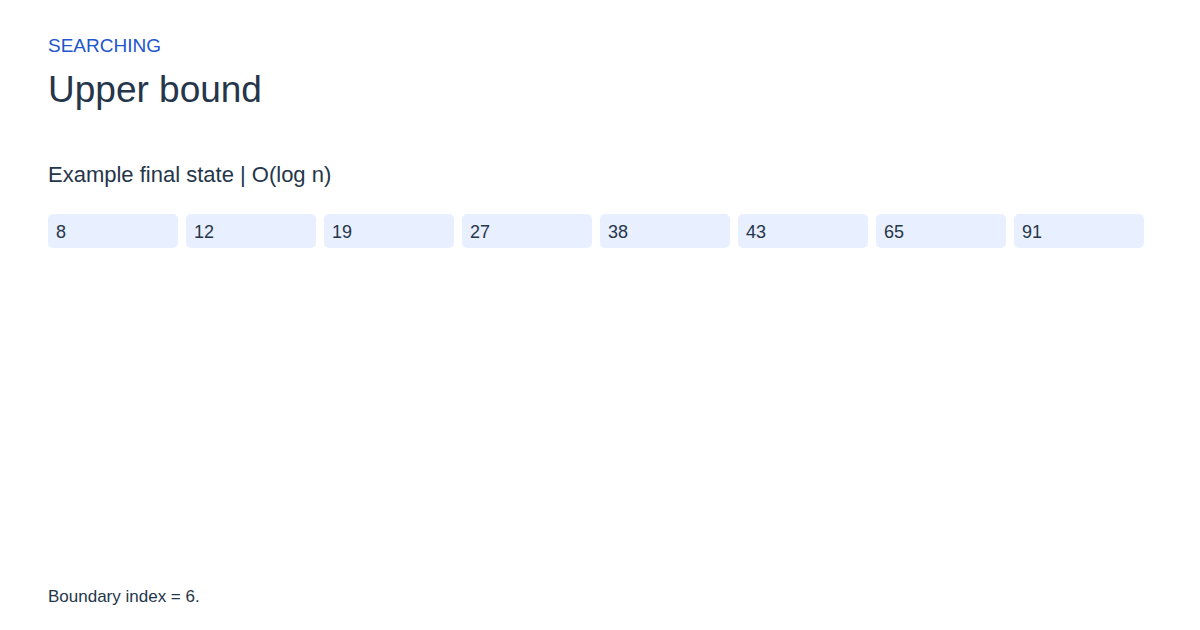
Step 4: Boundary index = 6.
State at this checkpoint
{
  "values": [
    8,
    12,
    19,
    27,
    38,
    43,
    65,
    91
  ],
  "active": [
    6
  ]
}
Expected final state
Boundary index = 6.
Complexity and input bounds
Family: Searching. Time complexity: O(log n).
Space complexity: O(1) auxiliary space.
Working-space bounds describe algorithm state and any explicitly noted output, excluding the visualization's saved timeline. Recording frames can use more memory than running the function alone. Here n is sequence length, V and E are vertex and edge counts, and other parameters refer to the named input dimensions.
2–24 comma-separated integers between 0 and 99. Follow with | target.
The playground validates these limits before starting. Downloaded functions are callable implementations, with parameter and output-buffer contracts in their comments; they do not all repeat the playground's input validation.
Common mistakes and limitations
An end-of-array boundary is valid and must not be dereferenced.
Further reading
For background on algorithm analysis and the JavaScript function interface:
- MIT OpenCourseWare: algorithm design and analysis foundations
- MDN: JavaScript function parameters and return values
Editorial and testing approach · Browse all algorithm guides
Complete JavaScript implementation
1 2 3 4 5 6 7 8 9 | // Requires ascending input. Returns first index with value > target, or n if no such value exists. Reference snippets assume validated playground inputs. Fixed scratch buffers have 256 slots. Sorting variants may use a different traversal strategy than the animation. function algorithm(a, n, target) { let l = 0; let r = n; while (l < r) { let mid = l + Math.floor((r - l) / 2); if (a[mid] < target || a[mid] == target) { l = mid + 1; } else { r = mid; } } return l; } |
Source
No original paper has been verified for this entry. This source is a reference text or teaching reference, not an asserted original publication.
- The Art of Computer Programming, Volume 3: Sorting and Searching (2nd edition)
Donald E. Knuth (1998). Reference book.