Published by Dimitris Kougioumtzis · Updated
Try the pattern at every possible starting position.
Try every feasible text offset and compare until mismatch or a full match, advancing one offset afterward.
When to use Naive string matching
Short strings and a direct matching baseline.
Choosing an alternative
KMP reuses prefix structure; Rabin-Karp filters with hashing.
Worked example: input and state changes
Example input
ABABABCABAB | ABABCThese checkpoints follow the actual example timeline. State details show the stored values and decisions; use the visualization to inspect every intervening step.
Step 0: Initial state.
State at this checkpoint
{
  "values": [
    "A",
    "B",
    "A",
    "B",
    "A",
    "B",
    "C",
    "A",
    "B",
    "A",
    "B"
  ],
  "active": []
}
Step 5: Compare text[4] with pattern[4] (C).
State at this checkpoint
{
  "values": [
    "A",
    "B",
    "A",
    "B",
    "A",
    "B",
    "C",
    "A",
    "B",
    "A",
    "B"
  ],
  "active": [
    4
  ]
}
Step 10: Compare text[5] with pattern[3] (B).
State at this checkpoint
{
  "values": [
    "A",
    "B",
    "A",
    "B",
    "A",
    "B",
    "C",
    "A",
    "B",
    "A",
    "B"
  ],
  "active": [
    5
  ]
}
Step 14: Compare text[4] with pattern[0] (A).
State at this checkpoint
{
  "values": [
    "A",
    "B",
    "A",
    "B",
    "A",
    "B",
    "C",
    "A",
    "B",
    "A",
    "B"
  ],
  "active": [
    4
  ]
}
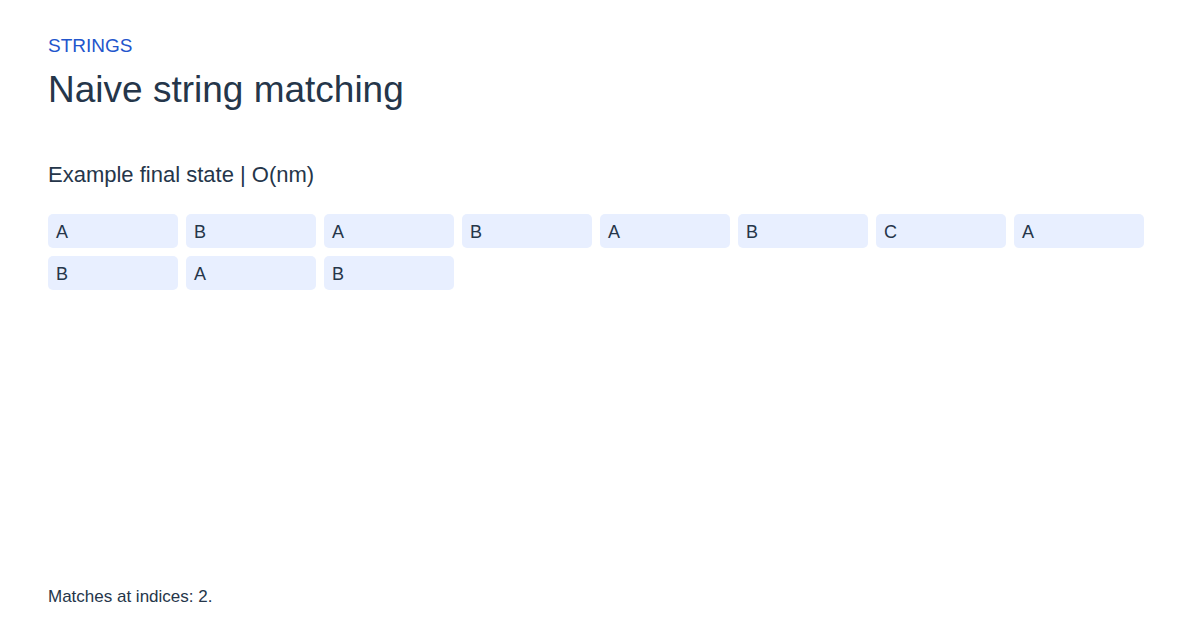
Step 19: Matches at indices: 2.
State at this checkpoint
{
  "values": [
    "A",
    "B",
    "A",
    "B",
    "A",
    "B",
    "C",
    "A",
    "B",
    "A",
    "B"
  ],
  "active": []
}
Expected final state
Matches at indices: 2.
Complexity and input bounds
Family: Strings. Time complexity: O(nm).
Space complexity: O(1) search state, excluding match output.
Working-space bounds describe algorithm state and any explicitly noted output, excluding the visualization's saved timeline. Recording frames can use more memory than running the function alone. Here n is sequence length, V and E are vertex and edge counts, and other parameters refer to the named input dimensions.
Text | pattern. Use 1–40 letters for the text and 1–16 for the pattern.
The playground validates these limits before starting. Downloaded functions are callable implementations, with parameter and output-buffer contracts in their comments; they do not all repeat the playground's input validation.
Common mistakes and limitations
Stopping at the first match misses later and overlapping occurrences.
Further reading
For background on algorithm analysis and the JavaScript function interface:
- MIT OpenCourseWare: algorithm design and analysis foundations
- MDN: JavaScript function parameters and return values
Editorial and testing approach · Browse all algorithm guides
Complete JavaScript implementation
1 2 3 4 5 6 7 8 9 10 | // Text and pattern are arrays of character codes (Python also accepts strings). Writes all match indices. Reference snippets assume validated playground inputs. Fixed scratch buffers have 256 slots. Sorting variants may use a different traversal strategy than the animation. function algorithm(text, n, pattern, m, matches) { let count = 0; for (let i = 0; i <= n - m; i++) { let j = 0; while (j < m && text[i + j] == pattern[j]) { j++; } if (j == m) { matches[count++] = i; } } return count; } |
Source
Primary research source for the algorithm or its underlying method. The playground is a bounded teaching implementation, not the publication's original program.
- Algorithms on Strings, Trees and Sequences
Dan Gusfield (1997). Reference book.